![Layer 2.png]](https://help.bookvault.app/hs-fs/hubfs/Layer%202.png?height=31&name=Layer%202.png)
Bookvault can distribute your book to Amazon as part of our distribution service.
You don't need a KDP account and you don't need to create the Amazon listing yourself. Once your distribution information has been completed, we'll send your book information to Amazon through our retail feeds.
How does selling on Amazon with Bookvault work?
First, make sure your book's distribution information is complete in Bookvault.
The information you provide should match the details registered with the ISBN registry where your book was published. Once everything is ready, Bookvault sends your book information to Amazon.
When Bookvault sells your title on Amazon, we appear as Bookvault Direct.
Guide to setting your title up for distribution
How long does it take to appear on Amazon?
Amazon feeds can currently take approximately 2–6 weeks to go live, although listings will often appear closer to two weeks unless there is an issue generating the listing.
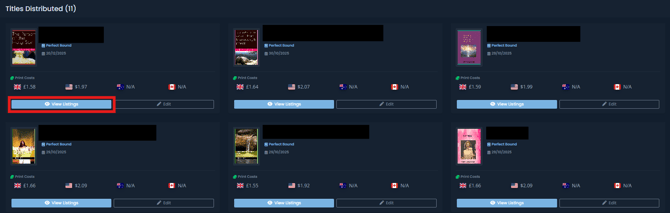
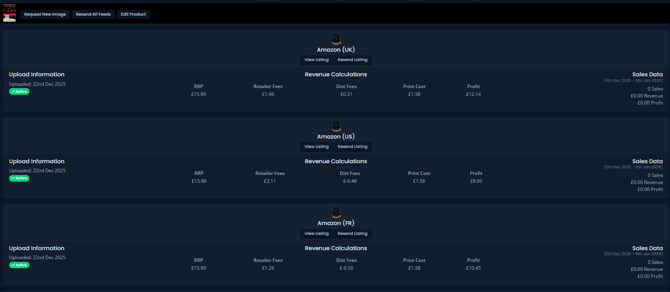
You can check your listing progress by going to:
Distribution → View Listings
Here you can see whether a listing is pending or active, check for errors returned by Amazon and compare your metadata with the information held in Amazon's catalogue.
For more information:
What if my book is already listed on Amazon?
That's not a problem. Amazon can have multiple sellers for the same title, so Bookvault can appear as an additional seller on the existing listing.
Do I need an Amazon KDP account?
No. You don't need to create a KDP account to sell your book on Amazon through Bookvault.
For more information about how this works:
Selling on Amazon with bookvault
Do I need to create my Amazon listing?
No. Bookvault submits your title information through our distribution feeds, so you don't need to manually create the Amazon listing yourself.
Will my customers get Amazon Prime delivery?
Books supplied through Bookvault aren't currently eligible for Amazon Prime delivery.
Will my Amazon listing have Look Inside?
Bookvault doesn't control Amazon's Look Inside feature.
You can find more information here:
What if my book isn't showing on Amazon?
If you've submitted your book for distribution but it hasn't appeared on Amazon yet, check the status of your listing through Distribution → View Listings.
Remember that Amazon listings can take time to appear after your information has been submitted.
For troubleshooting:
What if there's a problem with my Amazon listing?
If your listing is live but something isn't displaying as expected — such as the description, cover image or other listing information — see our dedicated troubleshooting guide.
Can my book be sold on Amazon globally?
Bookvault distribution isn't limited to Amazon.co.uk. Your title can be made available through Amazon marketplaces in other territories through our distribution network.
Can I put my book on pre-order on Amazon?
Bookvault cannot send the Amazon feed until your publication date, so Amazon pre-orders aren't currently available through Bookvault.
Can I exclude Amazon from global distribution?
Currently, you can't exclude Amazon individually.
You can either opt into Bookvault's wider distribution or make your book available through The Great British Bookshop without wider distribution.
Excluding Amazon from Distribution
How do I see my Amazon orders?
Amazon orders can be viewed through Reporting in your Bookvault account.
Here you can view your orders and see a breakdown of the profit you've made from your sales.
How do I remove my book from Amazon?
If you need your book removed from Amazon, contact our customer service team at:
Include the ISBN of the title you'd like removed so our team can help you.