![Layer 2.png]](https://help.bookvault.app/hs-fs/hubfs/Layer%202.png?height=31&name=Layer%202.png)
Once your book has been submitted for distribution, Bookvault sends your title information to Amazon electronically.
Although most feeds are accepted and the book is listed for sale, Bookvault can't guarantee that every title will be available in every Amazon territory.
How long does it take for my book to appear on Amazon?
Amazon can take approximately 2–6 weeks to process a title and make it available for sale.
Listings will often appear closer to two weeks, but some can take longer.
Why hasn't my book appeared yet?
There are several common reasons.
Future publication date
If your publication date is in the future, Bookvault won't send the feed to Amazon until that date.
Bookvault currently doesn't offer Amazon pre-orders, so Amazon's processing time begins after the publication date.
Amazon is still processing the listing
Even after Bookvault has sent the feed successfully, Amazon can take 2–6 weeks to process it.
Your book information doesn't match
The information you've entered into Bookvault should match the information officially registered against your book.
For example, if the registered imprint is Bookvault Publishing but you've entered Bookvault, Amazon may reject the feed because the information doesn't match.
How do I check my Amazon listing status?
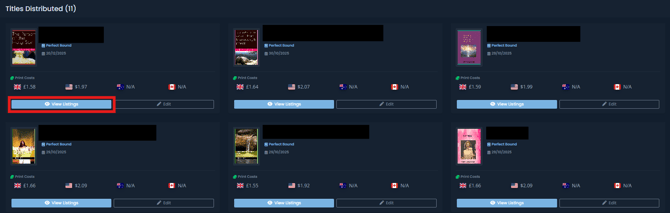
Go to:
Manage Distribution → View Listings
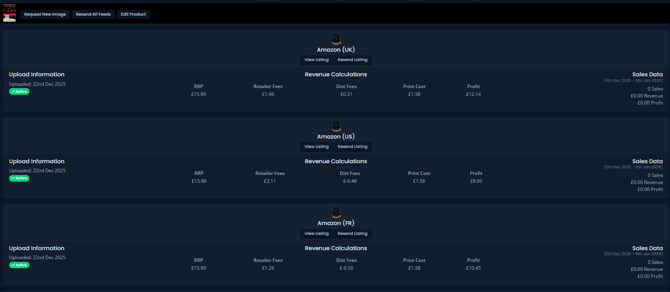
Here you can see whether your Amazon listing is:
- Pending
- Active
- Experiencing an issue
You can also see any error messages Amazon has returned and compare your metadata with the information Amazon currently holds in its catalogue.
If Amazon has flagged a problem, check the Listing Report for more information about what needs correcting.
What if I still can't work out why my book isn't showing?
If you've checked View Listings and still can't identify the problem, contact:
The Bookvault team can check whether Amazon has returned any additional error messages for your title.
For a wider overview of selling through Amazon, see: