![Layer 2.png]](https://help.bookvault.app/hs-fs/hubfs/Layer%202.png?height=31&name=Layer%202.png)
There are a number of online tools that can analyse your PDF and check whether your fonts are embedded. You can also check this directly using Adobe Reader or Adobe Acrobat.
How to check embedded fonts in Adobe Reader or Acrobat
Open your PDF in Adobe Reader or Adobe Acrobat.
Navigate to File → Properties.
Alternatively, use the keyboard shortcut Ctrl + D.
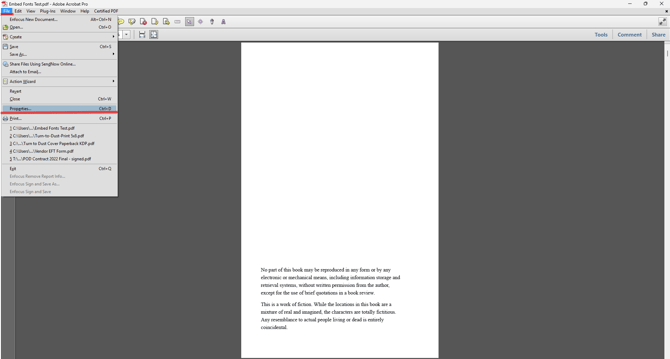
A Document Properties window will appear with a menu across the top.
Select Fonts to view all of the fonts that have been identified within your PDF.
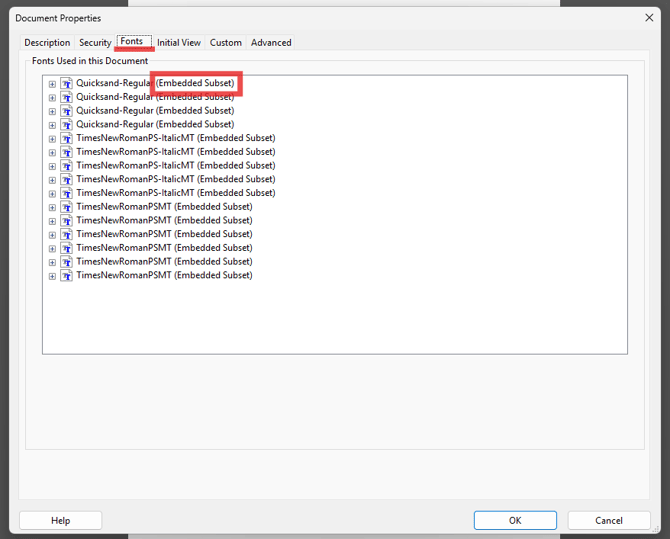
How do I know if my fonts are embedded?
Check the information displayed alongside each font.
Each font should show either:
- (Embedded)
- (Embedded Subset)
If either of these appears alongside the font, it indicates that the font is embedded within your PDF.