![Layer 2.png]](https://help.bookvault.app/hs-fs/hubfs/Layer%202.png?height=31&name=Layer%202.png)
To get started, you'll need a Bookvault account. Once you're logged in, you can create and manage your publication through the Publishing Projects section of your account.
1. Start a Publishing Project
From your Bookvault account, select Publishing Projects from the left-hand menu.
This is where your publication information and the progress of your publishing projects are kept.
If you haven't created a project before, select Get Started Now.
You'll then be asked whether you'd like to publish a:
- Print Book
- Bundle
2. Choose your book specifications
Next, you'll choose the specifications for your book.
Binding
Select the binding you'd like to use for your book, such as paperback or hardback.
Your choice of binding affects the construction, appearance and durability of the finished book.
Lamination
Choose the finish for your book cover.
Depending on your book specifications, Bookvault offers:
- Matt
- Gloss
- No lamination
Lamination adds a protective layer to the cover and can help protect it from scratches, spills and general wear.
Book size
Choose from the available standard book sizes or enter a custom size.
Custom sizes can be entered up to 297mm × 297mm
3. Enter your book details
Continue through the Publishing Project and provide the information requested for your book, including your page count and any additional options required for your chosen specifications.
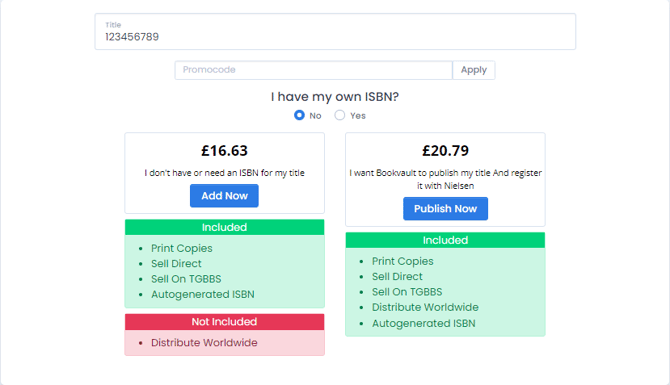
4. What if I don't have an ISBN?
You can continue with a Publishing Project if you don't already have an ISBN.
Bookvault can help publish and register your book with Nielsen as part of the publishing process.
5. Submit your Publishing Project
Once you've completed the required information, select Publish Now.
You can then follow the progress of your publication from your Publishing Projects dashboard.

And relax! Your book is one step closer to being the next Booker Prize winner.