![Layer 2.png]](https://help.bookvault.app/hs-fs/hubfs/Layer%202.png?height=31&name=Layer%202.png)
Once you've placed an order with Bookvault, you can monitor its progress directly from your Bookvault account.
How to view your Bookvault orders
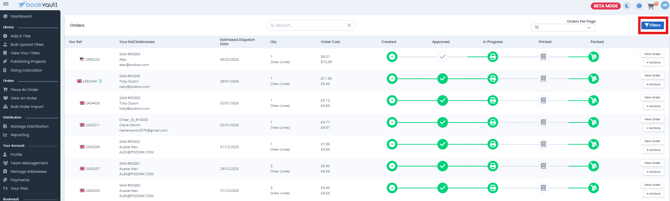
From the navigation menu on the left-hand side of the Bookvault portal, select View An Order.
You'll then see your recent and previous Bookvault orders.

How to check your order status
Your order will move through the different stages of production.
The green circles show how far your order has progressed. You can hover over a completed stage to see the date and time your order reached that point.


How to see which books are in your order
Select View Lines against an order to see the individual titles included and the quantity ordered for each one.
This is particularly useful if your order contains multiple books, as individual titles within the same order may progress through production at different times.
If a multi-title order appears to be taking longer than expected, check the individual order lines before assuming the entire order has stopped progressing. Most of the titles may already be complete while one or more are still moving through production.

How to view your Order Summary
Select View Order to see more information about an individual order.

Your Order Summary includes information such as:
- Your reference number
- Your Bookvault (BV) reference
- Current order status
- Delivery address
- Selected shipping option
- Order costs
You can also edit the delivery address from this page.

How do I track my order after dispatch?
Once your order has been dispatched, you can follow its delivery using the tracking number, provided you've selected a tracked delivery service.
This is information we're bringing across from the article we're deleting, so make sure this section is added.
How to search for an order
If you have lots of orders, use the search function in the top-right corner.
You can search using information such as:
- Order number
- Title
- ISBN
- Recipient
- Delivery postcode
Select the relevant result from the dropdown, or press Enter to view matching orders.

How to filter your orders
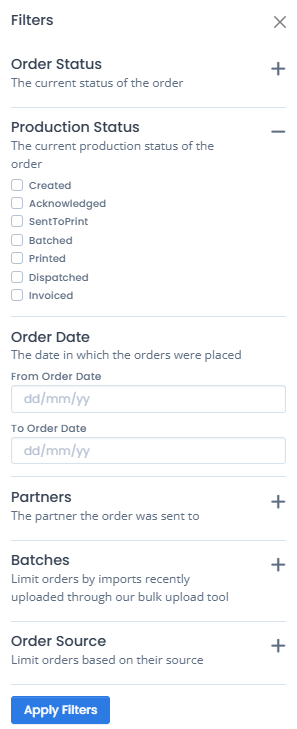
Select Filters in the top-right corner to narrow down the orders displayed.
You can filter your orders using options such as:
- Production status
- Order status
- Order date
- Print partner
For example, you could use the filters to display only orders that are currently in production.
Can I make changes to a draft order?
If you've saved an order as a draft, you can access it from View An Order and make changes before completing it.
You can also select Delete Draft if you no longer want to proceed with the order, or complete it using the available payment option.
What if I need more information about my order?
If you can't find the information you need from the order page, raise a ticket through the Support section of your Bookvault account or email: Customers@bookvault.app
When contacting us, include your Bookvault reference number so our team can locate your order and help you more quickly.