![Layer 2.png]](https://help.bookvault.app/hs-fs/hubfs/Layer%202.png?height=31&name=Layer%202.png)
If you've registered for an IOSS code, you can add it to your Bookvault account and use it for eligible orders being shipped to customers in the EU.
Bookvault can pass the IOSS information you select to the courier to help with customs processing and show that VAT has already been collected where applicable.
How do I add my IOSS code to Bookvault?
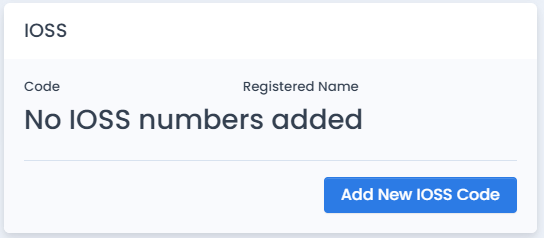
You can add your IOSS code from the Profile page of your Bookvault account.
Once it has been added, the code will be available to select when placing eligible orders.

How do I use my IOSS code for a manual order?
When placing an order directly through the Bookvault portal, select the relevant IOSS code during the ordering process.
Bookvault can then pass the selected IOSS information to the courier for customs processing.
How do I use my IOSS code with my online store?
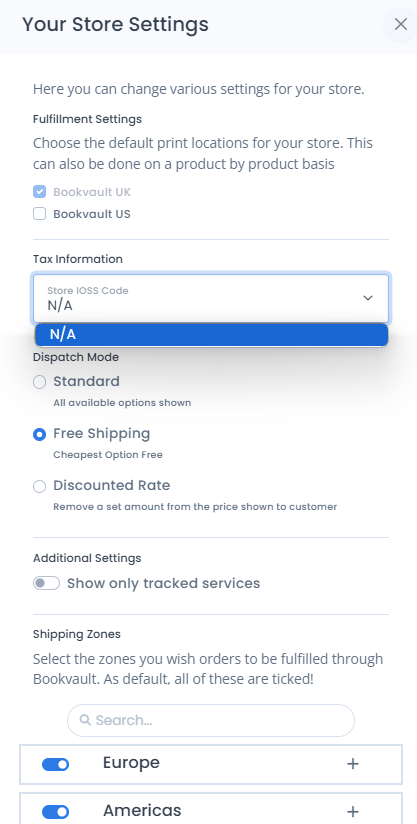
If you're selling through a connected eCommerce store, adding the IOSS code to your Bookvault profile is only the first step.
You'll also need to select the relevant IOSS code within your App Settings in Bookvault.
This ensures the correct IOSS information can be passed through when eligible orders are sent from your connected store to Bookvault.
When can IOSS be used?
IOSS is intended for eligible consignments being imported into the EU where VAT has been collected at the point of sale.
IOSS doesn't apply to every order, so make sure the order meets the relevant requirements before using your code.
Is IOSS the same as DDP?
No.
IOSS and DDP (Delivered Duty Paid) are different.
An IOSS code is used to support VAT handling on eligible EU orders where VAT has already been collected at checkout.
DDP is a shipping option where applicable duties and taxes are paid upfront so the recipient should not normally be asked to pay them on delivery.
Depending on how the order is being sold and shipped, either IOSS or DDP may be relevant.